
Why are the Tian Zi Ge grid lines missing?
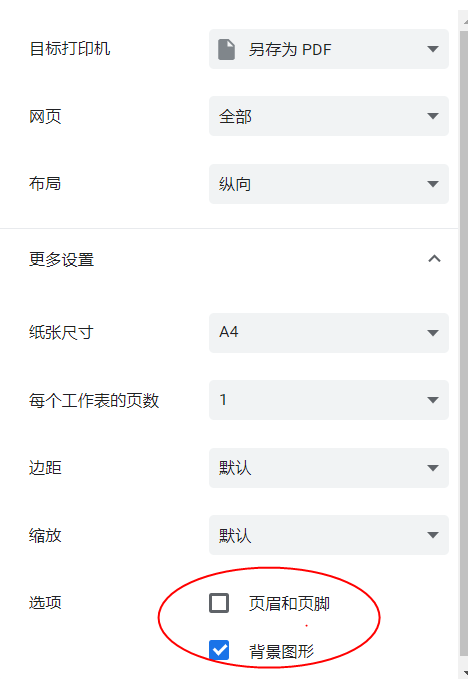
When printing, enable background graphics or background images in the browser print settings.
This page collects common questions about worksheet generation, printing, fonts, stroke order and input content. If display or printing looks wrong before or after generating a worksheet, check the notes below first.
When printing, enable background graphics or background images in the browser print settings.
The custom font must already be installed on the current computer, and the name you enter must exactly match the system font name. If you are not sure, check it in Word or your system font list first.
Separate words with commas. The pinyin dictation worksheet can wrap correctly only when the words are separated clearly.
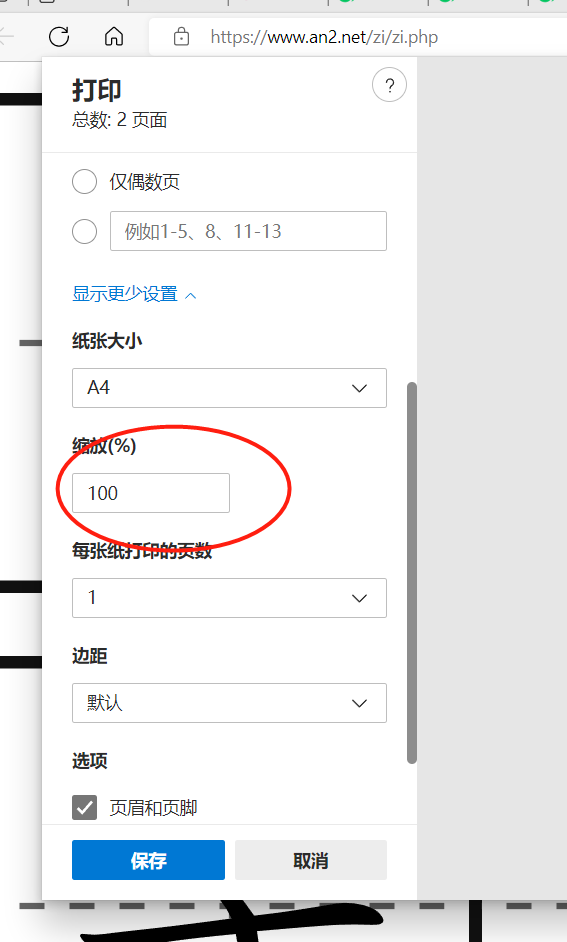
Check the print settings and make sure the scale is 100%. If the browser changes the scale automatically, the worksheet may only use part of the paper.
The stroke-order database supports most common Chinese characters. If a character is missing, the preview will try to show normal text or an empty practice grid. You can also send the missing character to hymanren666@gmail.com, and it may be added later.
Try a different browser. Chrome and Microsoft Edge are recommended. If you are using macOS and KaiTi is missing, try a Windows computer or install the required Chinese fonts.
Stroke-order worksheets currently support KaiTi only. If you selected Pang Zhonghua or Tian Yingzhang fonts but have not installed the font package, download and install the matching fonts first.
Glyph standards may differ by region. Tools that support stroke order can switch among Mainland China, Hong Kong and Taiwan standards. Choose the one that matches your local textbook.
You can use the normal worksheet generator and choose KaiTi or your own handwriting font. Basic strokes: ㇀㇁㇂㇃㇄㇅㇆㇇㇈㇉㇊㇋㇌㇍㇎丶一丨丿㇏乛𠃊𠄌亅𡿨ㄥ𠃑乚𠄎ㄣ⺄
Some fonts use irregular internal names, so the visible font name and the full system font name may be different. This site supports full font names. Known examples: LvMuJiJXP LvMuJi JXP; 段宁硬笔行书1,0 常规; CNType SongGeKaiShuS. If you meet a similar problem, you can send the font file by email and we will help check the full name.
Yes. Open the generated print page and choose Save as PDF in the browser print window.
On the worksheet preview page, use the right-side toolbar to switch between portrait and landscape. For other paper sizes, adjust the scale in the browser print window, such as using about 70% for A5 portrait.
Follow the WeChat official account. New features and important updates will be posted there first.

The site is deployed on servers in China and the United States. Usually, Chinese users use the China server and overseas users use the US server, but DNS may occasionally choose the wrong one. The footer text "Server in: CN" means you are visiting the China server; otherwise you are visiting the US server. If needed, you can set hosts manually: China server 39.106.71.204 www.an2.net an2.net; US server 45.79.92.118 www.an2.net an2.net.
Donation income is not enough to cover servers, bandwidth, development and maintenance, so Google ads are used to help keep the site free. We try to control the number and placement of ads so normal use is not affected. If you do not like ads, you may block them in your browser; the tools will still work.